

Take a Photo. AI Fills the Form
Your inspector takes a photo of any asset or defect. AI reads it and fills the inspection form automatically. No typing. No manual entry.

Move hotel inspections and audits off paper with the InspectWrk hotel and room inspection app. Hold consistent standards across guest rooms, common areas, and back-of-house operations.
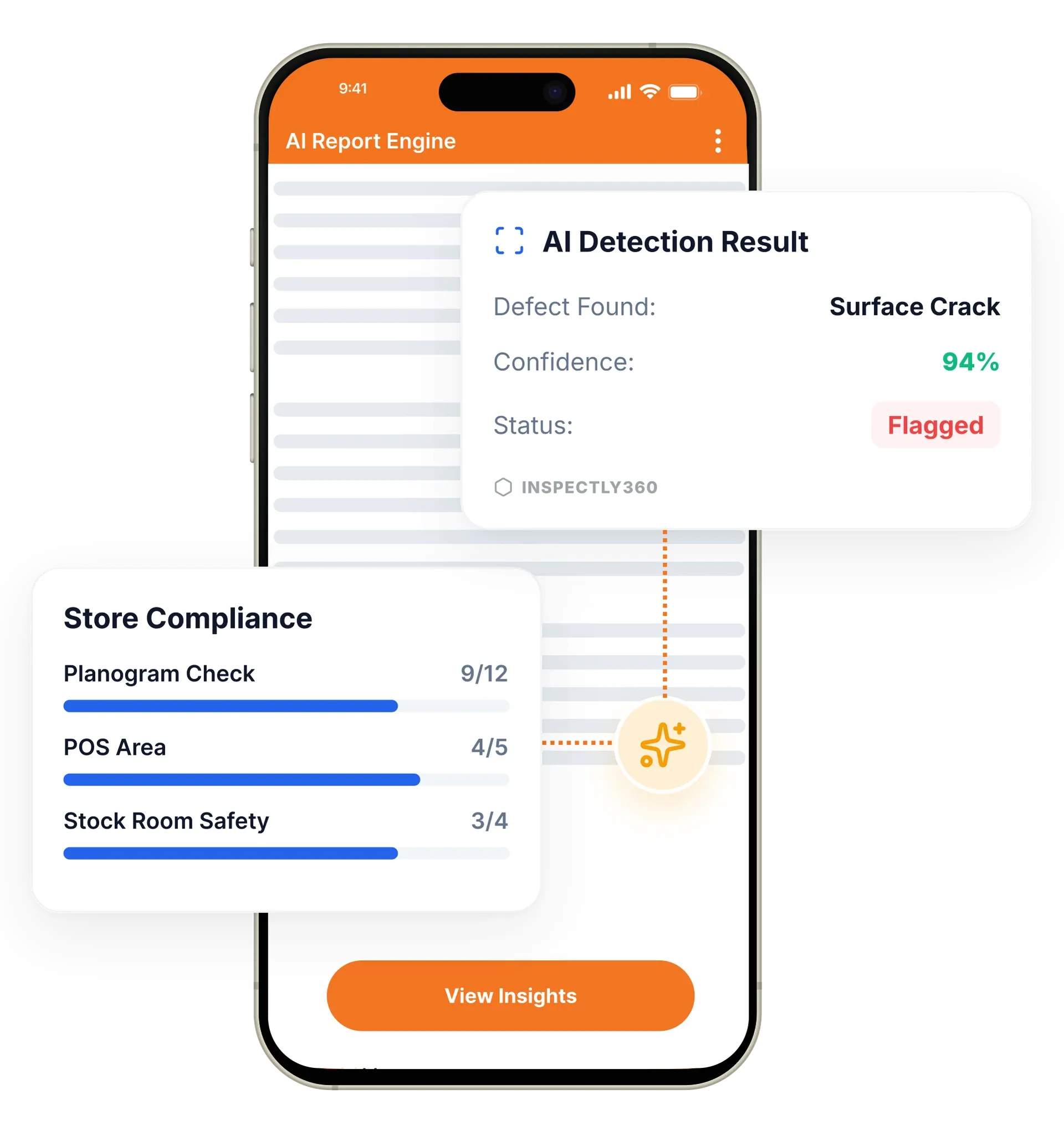
The hotel inspection app in InspectWrk lets housekeeping and management teams run room readiness, common area, and brand standards checks on a mobile app. It captures photo evidence on findings, routes critical issues to supervisors instantly, and produces consistent reports. It replaces paper room-inspection sheets, WhatsApp maintenance requests, and manually compiled standards reports.
The hotel inspection app in InspectWrk standardizes room readiness, housekeeping, and brand standards checks across every property. Field teams complete inspections on a mobile app that works offline in guest rooms, basements, and back-of-house areas with weak signal. AI fills forms from photos and voice notes. Supervisors get critical issues routed to them instantly, and management sees quality trends across properties on a live dashboard. The platform replaces paper room sheets and slow standards reports, so guest-impacting problems are caught and fixed before a guest ever notices them.
Standardize inspections for rooms and common areas with required steps.
Attach photos to findings to speed resolution and improve clarity.
Route critical issues to supervisors quickly to reduce guest impact.
Schedule recurring standards checks to maintain consistency.
Track quality outcomes across properties over time.
Generate consistent outputs for brand standards teams and managers.

Create digital checklists for guest rooms, corridors, lobbies, restaurants, and back-of-house areas, with required steps and photo evidence on key items.
Set recurring room readiness and standards inspections and assign them to housekeeping supervisors and duty managers across each property.
Teams complete inspections on a phone or tablet that works offline. AI fills the form from photos of any defect or cleanliness issue.
Critical findings go straight to a supervisor with a deadline. Management tracks quality trends across properties on a live dashboard.
Inspect rooms with structured criteria and route exceptions with evidence.
Track standards across properties with consistent criteria and reporting.
Use evidence-backed findings to coach teams and improve consistency.
Everything your field team does on paper, InspectWrk does automatically: faster, more accurate, and without the admin.
Your inspector takes a photo of any asset or defect. AI reads it and fills the inspection form automatically. No typing. No manual entry.

Inspectors speak their observations in any language. AI transcribes and fills the form in real time. Completely hands-free in the field.

The moment an inspection is submitted, a branded PDF, Excel, or CSV report generates automatically. No manual work. No waiting.

InspectWrk integrates with the tools your team already uses, including Zoho, Microsoft 365, and SAP. No double entry.

Your operations team sees completion rates, open issues, and compliance scores across all sites in real time. No chasing updates.
The costly version of this is a fault found during a room check that then travels by WhatsApp message to whoever is thought to be on duty. It may be seen, it may not, and there is no record that anyone was told. The room is released, the guest finds the problem, and the complaint is the first reliable signal that anything was wrong.
In the app the finding is raised against the specific room check that produced it, with a photo attached so the nature of the fault is clear without a follow-up conversation. Critical issues route to a supervisor immediately rather than waiting for the end of the round, which is what creates the window to fix or block the room before it is sold.
That window is the whole point. A guest rarely complains about one fault, they complain because it recurred and nothing changed. Quality trends across properties show whether a fault type keeps returning on the same floor or the same room set, so the response moves from repairing individual items to addressing the underlying cause.
“Rolling out digital checklists across multiple projects gave us instant visibility into recurring safety issues. We now resolve critical findings in hours instead of days.”
 Olivia CarterNorthbridge Infrastructure
Last updated: