

Take a Photo. AI Fills the Form
Your inspector takes a photo of any asset or defect. AI reads it and fills the inspection form automatically. No typing. No manual entry.

Generate branded PDF reports with photos, annotations, scores, and corrective actions automatically. Schedule delivery to stakeholders and keep a complete audit trail of every report.
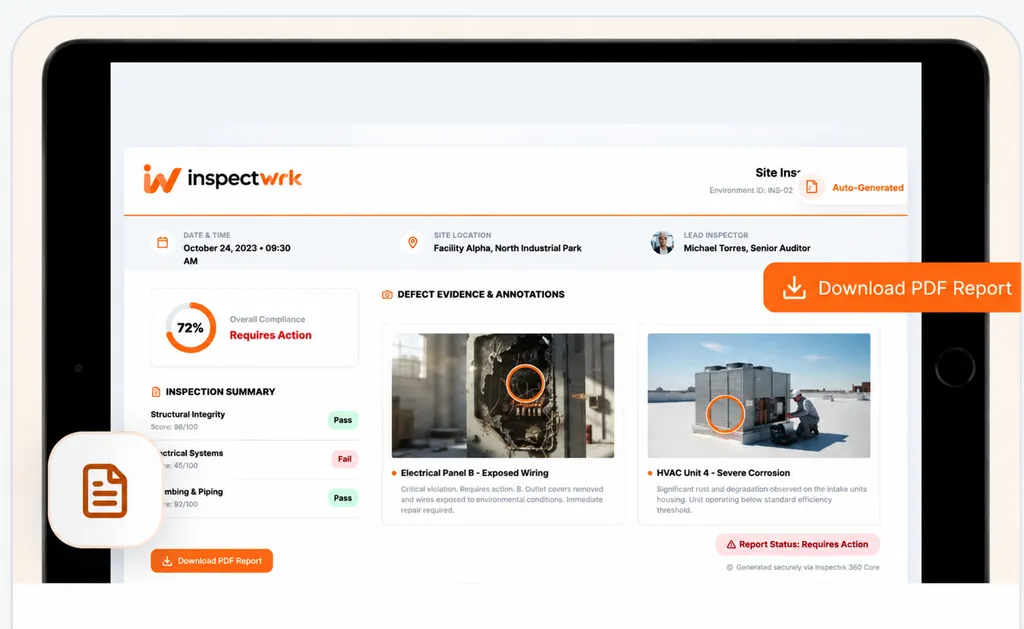
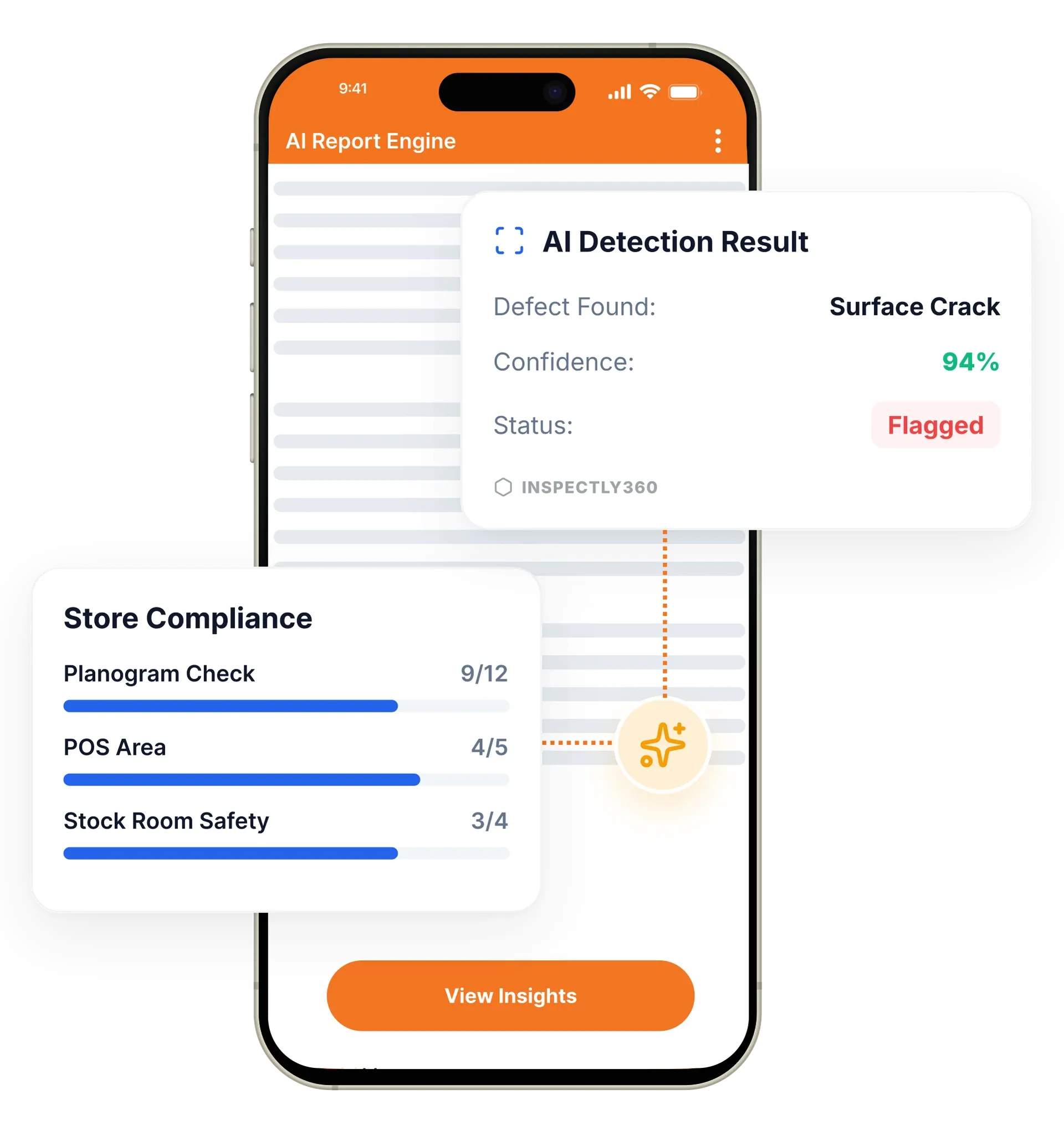
Automated reports in InspectWrk generate a branded PDF the moment an inspection is completed, with all checklist data, annotated photos, compliance scores, and corrective actions included. They replace hours of manual report writing in Word and Excel. A report that used to take an afternoon to assemble is ready in seconds, formatted for clients and regulators.
Automated inspection reports software in InspectWrk generates a digital inspection report the moment an inspection is completed, so operations teams stop assembling reports by hand. Each report pulls every checklist response, annotated photos, compliance scores, corrective actions, digital signatures, and GPS verification into a branded PDF audit report, ready for a client or a regulator. Real-time inspection reporting means managers see results as they sync, not days later. The platform replaces manual compilation in Word and Excel, removes copy-paste errors, and turns an afternoon of admin into a single step.
Assembling an inspection report by hand in a word processor takes an afternoon, lets copy-paste errors creep in, and reaches the client days after the inspection.
The outcome: Reports are ready in seconds, consistent for clients and regulators, and stored with a timestamped audit trail ready the moment an auditor asks.
Reports are generated automatically the moment an inspection is completed, with no manual compilation, formatting, or assembly.
Captured photos with annotations, severity markups, and captions are placed automatically into the correct report sections.
Compliance score calculations, pass and fail summaries, and weighted scoring results are included in every report.
Upload your logo, set brand colours, and customise report headers, footers, and cover pages for a professional presentation.
Configure automatic report delivery by email on a daily, weekly, or monthly schedule, with different reports for different groups.
Every report generated, accessed, and delivered is logged with timestamps, user identities, and distribution records.
Example: a completed check becomes a branded PDF delivered on schedule

The inspector completes the check on the mobile app, capturing checklist responses, annotated photos, signatures, and GPS verification.
The moment it is submitted, every response, photo, compliance score, and corrective action is pulled into a branded PDF with no manual formatting.
Annotated photos sit in the correct sections with their severity markups and captions already attached, because the report is built from the record.
The report goes out by email on a daily, weekly, or monthly cadence, with different reports for different groups.
Each report generated, opened, and delivered is recorded with a timestamp and user identity, building the audit trail.
Sends each client property its own branded PDF on schedule instead of assembling reports on a Friday afternoon.
Produces an audit-ready evidence pack with photos, scores, sign-offs, and timestamps from the same inspection record.
Receives a monthly executive summary that aggregates inspection data across every site.
Automated reports turn a finished inspection into a document. They build on the analytics, photo evidence, and delivery channels the rest of the platform provides.
Everything your field team does on paper, InspectWrk does automatically: faster, more accurate, and without the admin.
Your inspector takes a photo of any asset or defect. AI reads it and fills the inspection form automatically. No typing. No manual entry.

Inspectors speak their observations in any language. AI transcribes and fills the form in real time. Completely hands-free in the field.

The moment an inspection is submitted, a branded PDF, Excel, or CSV report generates automatically. No manual work. No waiting.

InspectWrk integrates with the tools your team already uses, including Zoho, Microsoft 365, and SAP. No double entry.

Your operations team sees completion rates, open issues, and compliance scores across all sites in real time. No chasing updates.
The manual version of this job is assembly. Someone gathers the photos, types the findings, formats a document, totals the scores, and produces a file, usually days after the inspection happened. The delay is not only administrative: corrective actions start late because the findings are still sitting in a half-written document.
Automated reporting removes the assembly step rather than speeding it up. When the inspector submits on the mobile app, every checklist response, annotated photo, compliance score, corrective action, digital signature, and GPS verification is compiled into a branded PDF. The photos land in the correct sections with their severity markups and captions already attached, because the report is built from the inspection record rather than from a folder of files.
Delivery is scheduled too. Reports go out daily, weekly, or monthly by email, with different reports for different groups, so a property owner receives their site report while an executive receives the portfolio summary. For a facilities management company running many client properties, that is the difference between one recurring afternoon of work and none.
“Rolling out digital checklists across multiple projects gave us instant visibility into recurring safety issues. We now resolve critical findings in hours instead of days.”
 Olivia CarterNorthbridge Infrastructure
Last updated: