

Take a Photo. AI Fills the Form
Your inspector takes a photo of any asset or defect. AI reads it and fills the inspection form automatically. No typing. No manual entry.

Standardize room-by-room checks with photo evidence, clear sign-offs, and consistent standards across teams and properties, so every room is verified ready before a guest walks in.
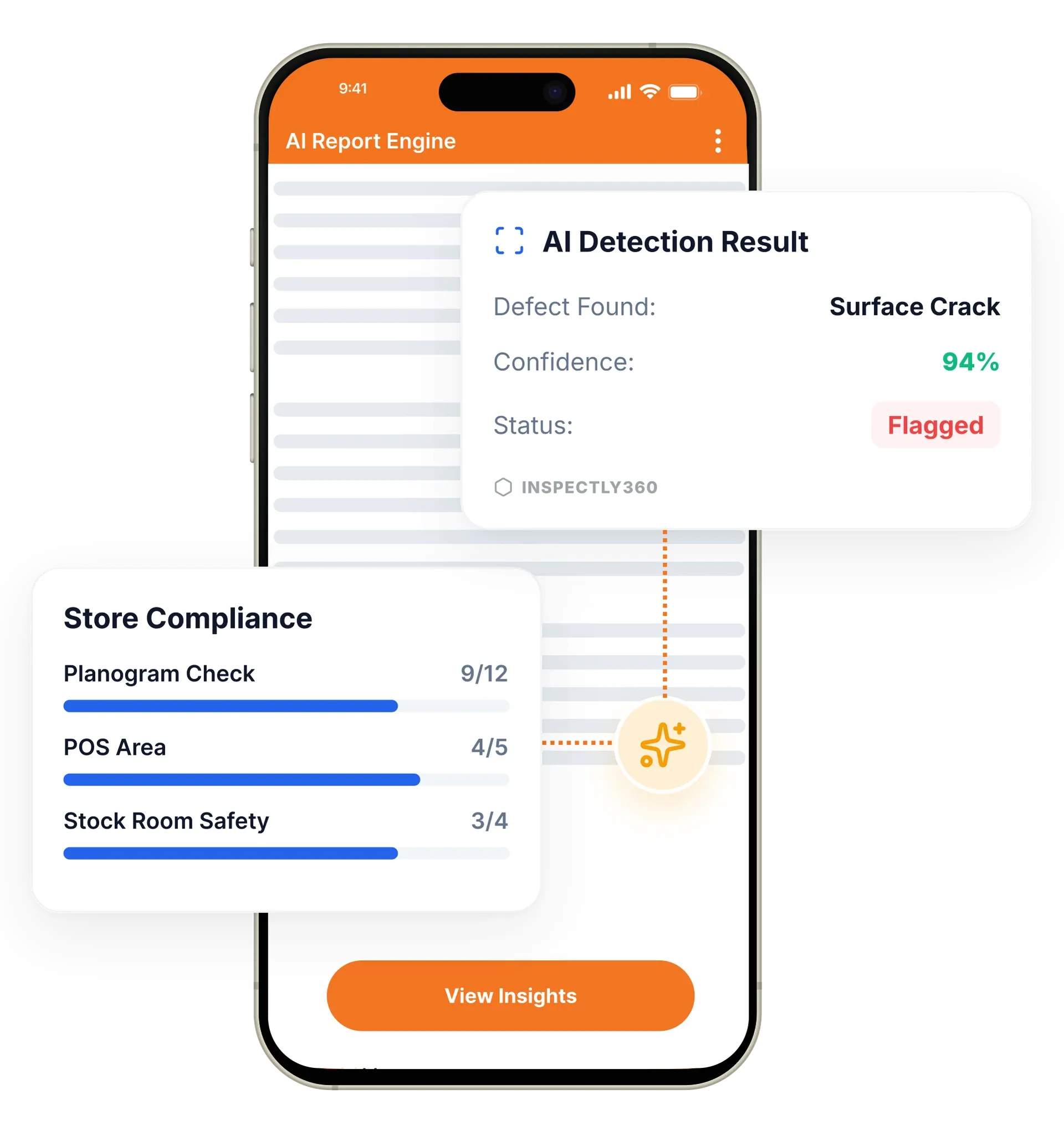
Housekeeping inspections in InspectWrk are room readiness checks completed on a mobile app instead of paper. Supervisors score rooms and common areas against consistent criteria, photograph any issue, and route rework before a guest is affected. The app replaces paper room sheets, clipboard checks, and verbal handovers with one scored digital record and a live readiness dashboard.
Housekeeping inspections in InspectWrk are digital room readiness checks supervisors run on a phone instead of paper. Housekeeping quality depends on consistent standards and fast feedback loops, so the platform supports structured room-by-room criteria, photo evidence on exceptions, and reporting that helps supervisors coach teams. Critical issues escalate to a supervisor immediately, so problems are fixed before they reach a guest. Reports build automatically, and managers track quality trends across every property on a live dashboard. The result is consistent readiness standards, less guest impact, and clear evidence for brand and service reviews.
Standardize inspections across rooms and common areas with required steps.
Attach photos to exceptions for faster resolution and clearer coaching.
Notify supervisors when critical issues are found to reduce customer impact.
Run scheduled quality checks to maintain consistent service standards.
Track inspection outcomes over time to identify recurring issues and training needs.
Generate consistent outputs for management review and training documentation.

Turn brand standards into structured checklists for guest rooms, suites, and common areas, with required steps so no part of a room is skipped.
Housekeeping supervisors check each room on a phone, capture photos for any exception, and add a sign-off. The app works offline across floors with weak Wi-Fi.
A failed item routes a notification to the right supervisor and creates a corrective action, so rework happens before the room is released to a guest.
Every inspection feeds quality dashboards and reports, so managers see readiness across all properties and coach teams using photographed examples.
Housekeepers and supervisors run room readiness, deep-clean, and pre-arrival checks on mobile. AI fills the form from photos so the room moves to ready without typing.
Standardised checklists keep brand standards on the floor, not in the binder. Recurring issue detection catches the same miss repeating across rooms before it becomes a complaint.
A real-time dashboard shows clean rooms, pending rooms, and open issues across every floor. Front office sees room status without calling housekeeping.
Housekeepers, supervisors, and engineers see the same workflow on their device. Issues raised in the field land with the right person in seconds, not at end of shift.
Supervisors perform readiness inspections and route rework immediately with evidence.
Track consistency across properties with standardized criteria and reporting.
Use trends to identify gaps and coach teams with specific examples and photos.
Everything your field team does on paper, InspectWrk does automatically: faster, more accurate, and without the admin.
Your inspector takes a photo of any asset or defect. AI reads it and fills the inspection form automatically. No typing. No manual entry.

Inspectors speak their observations in any language. AI transcribes and fills the form in real time. Completely hands-free in the field.

The moment an inspection is submitted, a branded PDF, Excel, or CSV report generates automatically. No manual work. No waiting.

InspectWrk integrates with the tools your team already uses, including Zoho, Microsoft 365, and SAP. No double entry.

Your operations team sees completion rates, open issues, and compliance scores across all sites in real time. No chasing updates.
A housekeeping inspection app is the digital tool a hotel or facilities team uses to check that rooms and shared areas have been cleaned to standard. Instead of a paper checklist, the supervisor inspects each room on a phone, scores it against set criteria, and submits the result instantly.
InspectWrk gives housekeeping teams structured room-by-room checks, photo evidence on anything below standard, and reporting that lets a manager see readiness across the whole property without walking every floor.
Paper housekeeping rounds are slow and hard to track. A housekeeper cannot see in real time which rooms are now the priority, a supervisor cannot check progress without walking the corridor, and reception cannot tell which rooms are ready for the next check-in.
Manual methods also lose detail. Handwritten notes get misread, so a room is skipped or cleaned incorrectly. Performance data, cleaning times, recurring faults, and quality scores, is almost impossible to assemble, so managers cannot see where standards are slipping or who needs coaching. As a property adds rooms or sites, the paper system stops scaling.
InspectWrk turns the housekeeping round into a structured digital workflow:
Before InspectWrk: a housekeeper works from a printed list, a supervisor spot-checks rooms and notes faults on paper, and reception phones the floor to ask what is ready. A recurring fault is only noticed when a guest complains a second time.
After InspectWrk: each room is inspected and scored in the app, reception sees readiness live, and a maintenance issue becomes a routed task with a photo attached. Managers coach teams from trend data instead of guesswork.
Yes. With InspectWrk you use shared templates so every property follows the same room readiness criteria, which makes results directly comparable and consistent. A pass at one hotel or building means the same standard was met as a pass at another. Supervisors check rooms and common areas against identical steps, and findings, photos, and scores are recorded against the exact item. Dashboards then show how each property is trending side by side. When one location keeps falling behind on a specific standard, it is visible early, so managers can retrain that team or adjust schedules before guests are affected.
“Rolling out digital checklists across multiple projects gave us instant visibility into recurring safety issues. We now resolve critical findings in hours instead of days.”
 Olivia CarterNorthbridge Infrastructure
Last updated: