

Take a Photo. AI Fills the Form
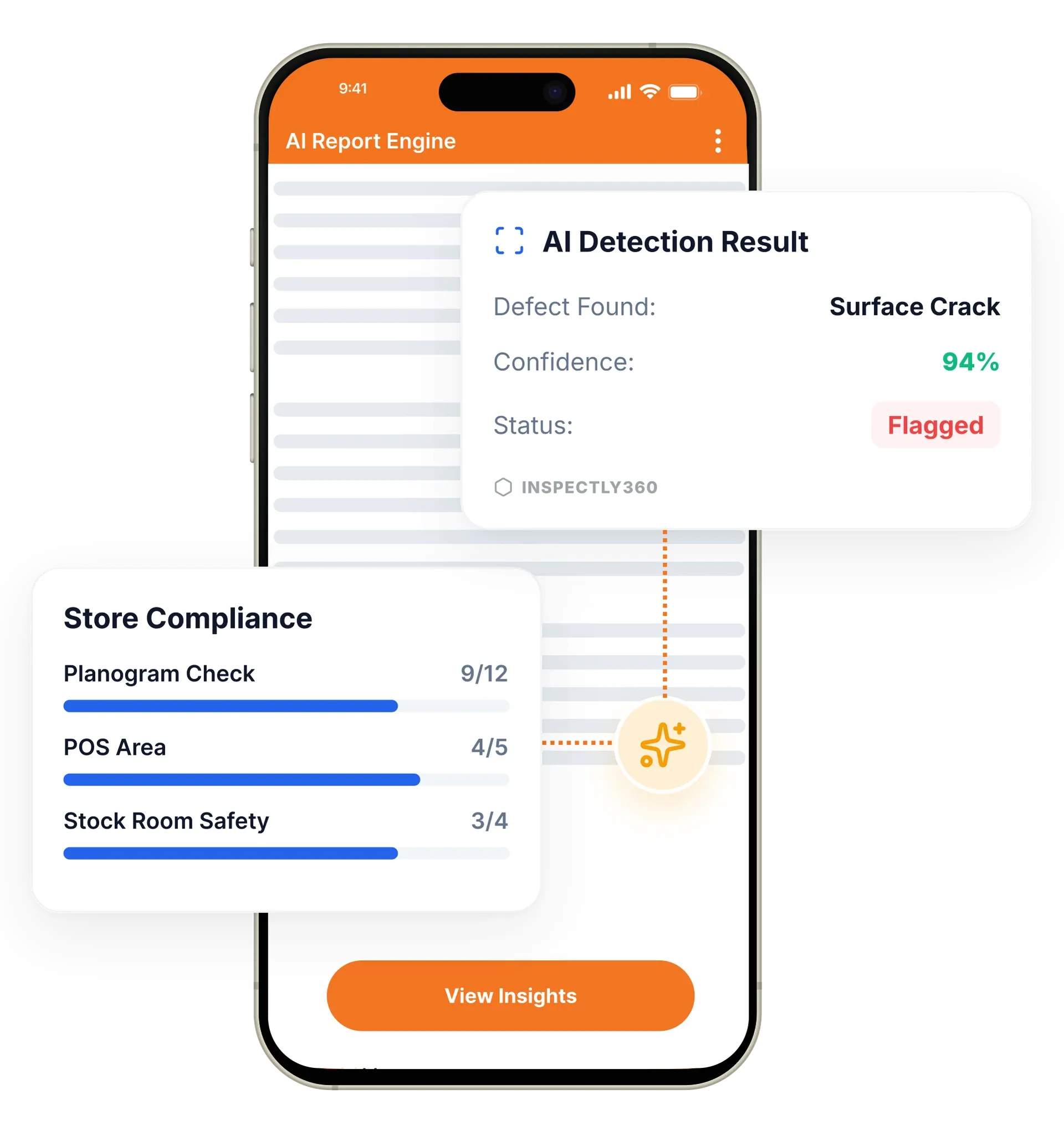
Your inspector takes a photo of any asset or defect. AI reads it and fills the inspection form automatically. No typing. No manual entry.

Turn raw inspection data into clear, actionable intelligence. Configurable dashboards, automated PDF reports, and trend analysis give you the visibility to drive continuous improvement across every site.
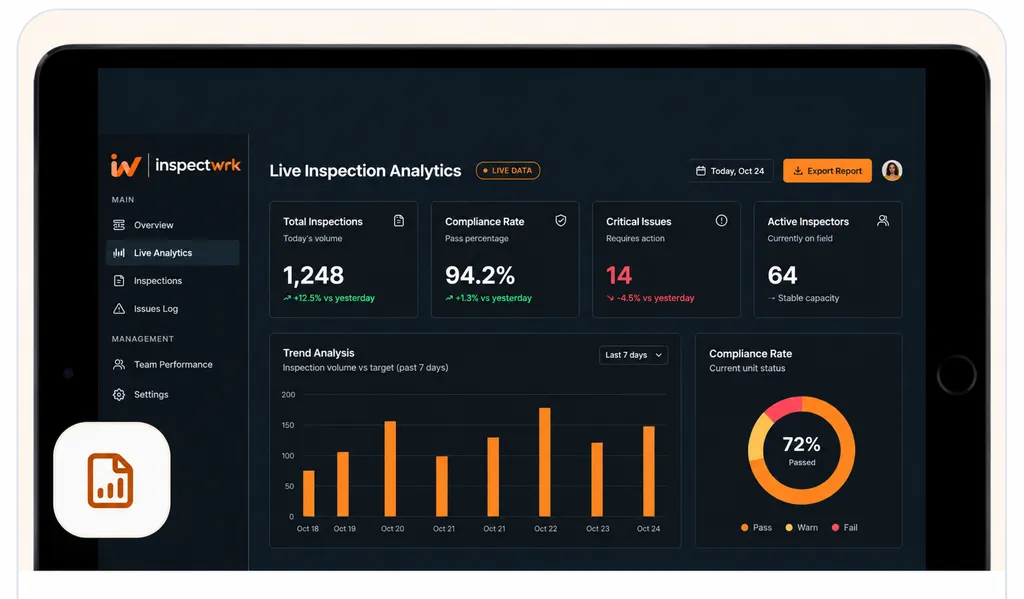
Inspection analytics in InspectWrk turns completed inspections into live dashboards, trend charts, and issue heatmaps. It replaces spreadsheets, manual report compilation, and email attachments with one real-time view of compliance, open issues, and team performance. Managers see what is happening across every site without calling a single manager.
Inspection analytics in InspectWrk turns thousands of inspection data points into a multi-site inspection dashboard for operations teams. Field teams complete inspections on a mobile app, and every score, photo, and finding flows into a live compliance dashboard the moment it syncs. Executives see portfolio-wide trends, site managers see their location, and real-time audit tracking shows which checks are complete, overdue, or failed. The platform replaces the Friday-afternoon spreadsheet with a real-time picture of compliance, open issues, and performance across all sites.
Inspection results sit in spreadsheets that are out of date the moment they are exported, so recurring issues go unnoticed until they become expensive.
The outcome: Managers see compliance across every site in real time and act on patterns early, without a Friday afternoon of manual compilation.
Drag-and-drop dashboard builder with custom widgets, KPIs, charts, and real-time data so each role sees the metrics that matter to them.
Track compliance rates, defect trends, resolution times, and team performance over time to spot patterns and predict issues before they recur.
Generate branded PDF reports with photos, annotations, scores, and corrective actions. Schedule delivery to managers, clients, and regulators.
Automate weekly, monthly, or quarterly report delivery via email to managers, clients, regulators, and stakeholders without manual export.
Visual heatmaps show problem areas, recurring issues, and compliance gaps across sites, zones, and equipment at a glance.
AI-powered compliance risk scoring flags sites and assets at risk of future failures so teams act before an auditor or client does.
Example: inspection execution data becomes a management report

Every completed inspection syncs its scores, photos, findings, and timestamps into a single source of truth, including checks captured offline.
Configurable dashboards refresh as data arrives, each scoped to the viewer's role and sites.
Trend analysis and issue heatmaps highlight recurring failures across sites, zones, and equipment rather than listing findings one at a time.
A branded PDF is produced from the inspection record, with photos, annotations, scores, and corrective actions already in place.
Weekly, monthly, or quarterly reports reach managers, clients, and regulators on a set cadence, with no manual export.
Reviews portfolio compliance on a configurable dashboard and drills from a regional score to the single inspection behind it.
Opens the issue heatmap to see where failures cluster across their sites and directs the next round of inspections there.
Tracks compliance rates and resolution times over time to confirm recurring findings are being closed, not just logged.
Reads the scheduled branded PDF for each property instead of compiling site results by hand every week.
Analytics sits downstream of the inspections your team runs and upstream of how results are shared. It draws on scheduled and completed work, then feeds the reports and alerts that go out.
Everything your field team does on paper, InspectWrk does automatically: faster, more accurate, and without the admin.
Your inspector takes a photo of any asset or defect. AI reads it and fills the inspection form automatically. No typing. No manual entry.

Inspectors speak their observations in any language. AI transcribes and fills the form in real time. Completely hands-free in the field.

The moment an inspection is submitted, a branded PDF, Excel, or CSV report generates automatically. No manual work. No waiting.

InspectWrk integrates with the tools your team already uses, including Zoho, Microsoft 365, and SAP. No double entry.

Your operations team sees completion rates, open issues, and compliance scores across all sites in real time. No chasing updates.
A single failed item tells the director very little. The question that matters is whether the same failure keeps returning, and at which locations. The issue heatmap answers that visually, showing where problems cluster across sites, zones, and equipment rather than listing findings one inspection at a time.
From the heatmap the director drills into trend analysis for the pattern itself. Compliance rates, defect trends, and resolution times are tracked over time, so a fault that appears at three sites in six weeks reads as a systemic problem rather than three unrelated tickets. That distinction changes the response: a recurring HVAC failure across a region points at the maintenance contract or the asset specification, not at the last inspector who logged it.
The drill-down runs from portfolio KPI to individual inspection without leaving the dashboard, so the director can move from a regional score to the specific photo that triggered a finding. Predictive compliance risk scoring then flags the sites and assets most likely to fail next, which turns the review from an account of what already went wrong into a list of what to address first.
“Rolling out digital checklists across multiple projects gave us instant visibility into recurring safety issues. We now resolve critical findings in hours instead of days.”
 Olivia CarterNorthbridge Infrastructure
Last updated: